Happy Wheels turns every obstacle course into a fight between speed, balance, and ragdoll chaos. Awkward riders lean over moving vehicles while hazards punish poor timing. A clean jump can become a full-body tumble in seconds.
Each run asks for more than acceleration. You must control your rider, judge each obstacle, and keep moving after hard impacts. The side-scrolling view keeps the route clear, but it never makes the physics predictable. That tension gives the Happy Wheels game its lasting appeal.
Fancy Force developed and published the game, which Jim Bonacci created. Start to play Happy Wheels online here, then see how long your rider can stay upright.
Happy Wheels: The Ragdoll Obstacle Formula
What Makes Runs Unstable
Happy Wheels builds its challenge around movement that never feels perfectly safe. Your rider travels through a side-scrolling obstacle course, but every wheel, slope, and landing can change the next second. The vehicle may roll forward while the rider leans too far back. A small mistake then shifts the whole body into danger.
Arrow Up accelerates, while Arrow Down brakes or reverses. Arrow Left makes the rider lean back or turn left, and Arrow Right makes the rider lean forward or turn right. These inputs work together rather than separately. Speed without balance creates trouble.
Special abilities add another decision point. Ejection can change the shape of a run, but it also leaves the vehicle behind. Every input matters more when the course narrows.
Why Mistakes Become Funny
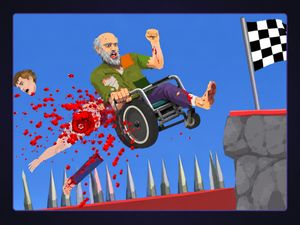
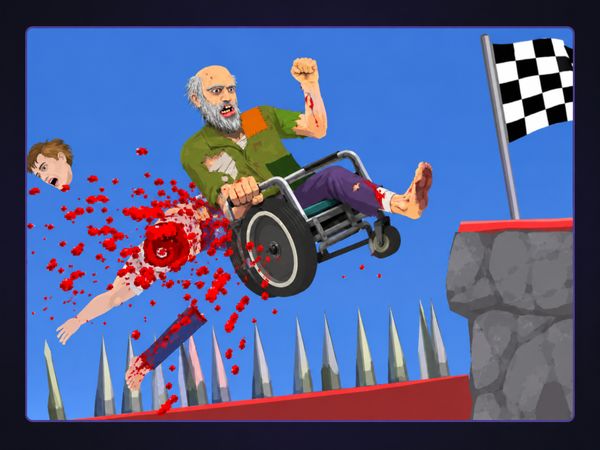
Ragdoll physics gives each failure a physical punchline. Characters react to impacts with exaggerated collapse and injury, so a missed landing never looks ordinary. One rider may fold over the vehicle. Another may tumble across the course after a sudden stop.
The humor comes from surprise, not from easy success. You may approach an obstacle with a clear plan, then watch the rider lose control in an unexpected way. Those failures feel memorable because the physics connect your input to the result. Happy Wheels makes mistakes visible, dramatic, and strangely entertaining.
What Success Actually Looks Like
Success means reaching the finish while keeping enough control to survive the route. You do not need a flawless run every time. A damaged rider can still make progress when the vehicle remains useful and the next obstacle allows recovery. Learn the course, manage speed, and treat every landing as a fresh test.
Character Choice Changes the Entire Run
Single Rider Characters
Ragdoll physics still turns a hard impact into a sudden loss of control.
Watch the rider’s posture as the vehicle changes direction. Arrow Left leans back or turns left, while Arrow Right leans forward or turns right. Arrow Up adds acceleration, and Arrow Down applies braking or reverse. Small adjustments help you approach ramps and uneven ground without overcorrecting.
The Space Bar triggers the primary special ability. Shift and Ctrl handle secondary special abilities, and Z ejects the rider. These controls give a single rider more options during a difficult section. Use them with the vehicle’s movement in mind, rather than pressing them randomly during a crash.
Multi Playable Characters
Multi Playable Characters use more than one person on one vehicle. The named group includes Irresponsible Dad, Moped Couple, Santa Claus, and Irresponsible Mom. Their extra bodies change handling and recovery because more than one person shares the setup.
That difference becomes clear when the vehicle tilts or hits an obstacle. A single rider gives you one body to track. A multi playable choice creates more movement to manage. Watch the whole vehicle, not just the person in front. The added bodies make familiar courses feel less predictable.
Choosing the Right Vehicle
Choose a vehicle based on the course’s demands. A setup that feels quick may punish rough landings, while a different one may give you more time to correct your angle. Test how each choice responds to acceleration, braking, and leaning. Then keep the character that matches your control style.
How Happy Wheels Handles Damage and Failure
Ragdoll Injuries
Ragdoll injuries turn contact into a lasting problem during a run. Characters can suffer exaggerated physical collapse and limb loss after strong impacts. The rider may still move, yet the original balance and control can change sharply. That damaged state gives every obstacle more weight.
Do not treat the rider as a simple marker on the screen. The body reacts to the vehicle, the ground, and nearby hazards. A landing that saves the wheels may still throw the rider forward. A collision that looks minor can leave the character poorly positioned for the next section.
Damage also makes the finish feel earned. You may limp through a course with limited control, then reach the end after several desperate corrections. Happy Wheels does not hide the cost of mistakes. It places that cost directly into the movement.
Surviving Broken Runs
Keep going when the vehicle still moves and the route remains open. Reduce speed before the next obstacle, then use gentle leaning instead of a large correction. Arrow Down can brake or reverse when forward movement becomes dangerous. A damaged run rewards patience more than panic.
Sometimes the safest choice changes your position entirely. Z ejects the rider, which can separate you from a failing vehicle. That action does not guarantee safety, so judge the nearby space first. Look for a route that gives the rider room to land and continue.
Learning From Crashes
Study the moment of failure instead of restarting without thought. Check whether speed, posture, or impact caused the collapse. Then change one decision on the next attempt. This turns a crash into useful information and makes later runs more controlled.
Building Progress Through User-Generated Levels
Official Course Structure
The official course structure gives Happy Wheels its basic rhythm. You move through side-scrolling obstacle courses, read the space ahead, and aim for the finish. Each route tests the relationship between rider, vehicle, and hazard. The goal stays clear even when the path becomes chaotic.
Start by reading the opening section before committing to full speed. Early obstacles show how much room you have for leaning and recovery. Use that information to set your pace for the next stretch. A careful opening can reveal the course’s movement before the harder sections arrive.
Different character setups change how you approach the same kind of route. Single riders keep the body count simple. Multi playable characters add more movement around the vehicle. The course stays recognizable, but your timing and recovery choices must change with it.
Community Level Variety
User-generated levels expand the game beyond a fixed set of obstacle ideas. Community courses can change the shape, timing, and spacing of challenges. One route may demand careful movement, while another pushes you into fast reactions.
That variety keeps familiar mechanics fresh. The same acceleration and leaning controls can feel different when a creator changes the route around them. Treat each custom course as a new test for the character and vehicle you selected.
Finding Clear Paths
Look ahead before using full speed. Identify slopes, gaps, and tight spaces, then choose a pace that leaves room for correction. When a route looks unclear, slow down and watch the rider’s posture. Clear movement beats reckless momentum.
Ready for another run? Start playing Happy Wheels here and test a new course with a different character.
Happy Wheels on Browser and Mobile
iOS Support
Official mobile releases include iOS support. The game brings its obstacle-course action to Apple mobile devices, with the same focus on characters, vehicles, impacts, and survival. Course timing still matters, since ragdoll physics can turn a small error into a major setback.
Android Support
Android also has an official Happy Wheels release. Mobile players get the core physics-based challenge on supported Android devices. The platform changes where you play, but the central aim remains unchanged: guide a rider through obstacles and reach the finish.
Compare with Similar Games
| Game |
Why Similar |
| House of hazards |
local multiplayer where players actively trigger hazards against each other while trying to complete tasks |
| Stunt Simulator |
vehicle-based stunt play focused on driving through dangerous ramps and smashing obstacles |
✨ Key Features of Happy Wheels
- Ragdoll physics
- Obstacle courses
- Multiple playable characters
- Multi playable characters
- Mobile releases
How to Play Happy Wheels
Step 1: Use the game controls
Use Arrow Up to accelerate. Use Arrow Down to brake / Reverse. Use Arrow Left to lean Back / Turn Left. Use Arrow Right to lean Forward / Turn Right.
Step 2: Pick a rider that matches the route
Choose a character whose vehicle fits the level’s hazards. Multi playable characters can feel harder to control.
Step 3: Keep momentum under control
Move forward steadily and avoid violent corrections. Sudden oversteering often sends the rider into spikes, walls, or pits.
Step 4: Use crashes as information
When you fail, watch where the collision starts. The game rewards learning obstacle timing and body position.
Step 5: Protect the rider’s center of mass
Try to keep the vehicle level after jumps and impacts. Recovering balance quickly is often the difference between finishing and breaking apart.
Happy Wheels FAQs
Can I play Happy Wheels on mobile devices?
Yes. Happy Wheels has a mobile release through App Store, Google Play.
Does Happy Wheels require a separate installation?
No. The browser version of Happy Wheels runs on the page without a separate installation.
Who developed Happy Wheels?
Happy Wheels was created by Jim Bonacci and is listed as developed and published by Fancy Force. The official site also identifies Totaljerkface as the home of Happy Wheels.
What are the different characters in Happy Wheels?
The game features several distinct playable characters, including Wheelchair Guy, Segway Guy, Irresponsible Dad, Effective Shopper, Moped Couple, Lawnmower Man, Explorer Guy, Santa Claus, Pogostick Man, Irresponsible Mom, and Helicopter Man. The evidence also identifies four multi playable characters: Irresponsible Dad, Moped Couple, Santa Claus, and Irresponsible Mom.
Is Happy Wheels still online?
Yes, browser play is still documented, and the official site remains active for Happy Wheels. The game also appears on major app stores, which confirms ongoing availability on mobile platforms.
What devices can you play Happy Wheels on?
The evidence supports browser play on computers, plus official iOS and Android versions.
Conclusion
Happy Wheels is a memorable side-scrolling physics-based obstacle course built around chaos, precision, and unpredictable ragdoll physics. Characters react to impacts with exaggerated physical collapse and injury, turning mistakes during obstacle runs into dramatic, often amusing failures. Multi playable characters such as Irresponsible Dad, Moped Couple, Santa Claus, and Irresponsible Mom also change handling and recovery by placing more than one person on a vehicle.
In singleplayer, keyboard controls give you direct command: Arrow Up accelerates, Arrow Down brakes or reverses, and the Left and Right Arrows let you lean or turn. The Space Bar, Shift, Ctrl, and Z keys add special abilities and eject actions. With its distinctive characters and physics-driven challenges, Happy Wheels remains easy to pick up and full of surprises. Play Happy Wheels right here on this page.

No comments yet. Be the first to share your thoughts!