Wrestle bros turns wrestling into a fast 2D physics fight where every jump, block, and action input can change the exchange. Blue Wizard Digital keeps the focus on direct control, arena movement, and quick rivalries. You do not need a long setup before the match starts.
The game supports solo CPU fights and multiplayer matches. That gives you two useful ways to learn. Practice movement against the CPU, then test your timing against another player. The simple controls leave room for smart spacing, sharp blocks, and well-timed actions.
Start to play Wrestle bros online here and learn the ring through real matches. Use the basics first, then build a style that fits your timing.
Wrestle bros at a Glance
What the Match Loop Feels Like
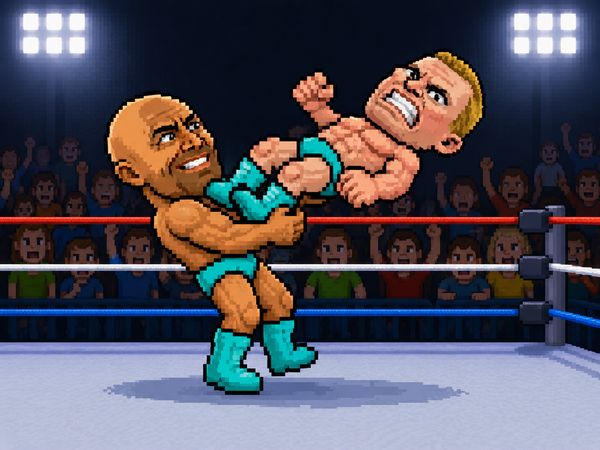
Wrestle bros plays as a quick 2D wrestling sports action game. You move around an arena, jump into position, block incoming pressure, and use your action input at the right moment. The physics give each exchange a lively feel. Small movements can change who controls the next moment.
Matches reward attention more than long button strings. Watch your opponent’s approach. Hold space when a block makes sense, then move before the exchange turns against you. A rushed action can waste your opening, while a patient input can create a strong turn. Each round becomes a short contest of distance, timing, and reactions.
Why the Game Stands Out
The appeal comes from its clean wrestling focus. Wrestle bros avoids a crowded control scheme, so new players can understand the core actions quickly. The physics also keep encounters from feeling perfectly predictable. You must adjust when a jump, collision, or sudden approach changes the position.
That mix creates quick rivalry matches. You can learn the basics in solo play, then find more pressure in multiplayer. The game stays easy to start while leaving room for better timing.
Which Version These Tips Fit
These tips fit the browser version of Wrestle bros available through the official site and browser game listings. They use only the shared movement, jump, block, and action controls. The same principles also help across CPU and multiplayer matches.
Controls and Special Moves
Movement and Basic Action Inputs
Player 1 uses the WASD keys for movement, jumping, and blocking. Player 1 uses G for the action. Player 2 uses the Arrow Keys for movement, jumping, and blocking, with L as the action input.
Keep those roles clear before a match begins. WASD handles Player 1’s core movement choices. The arrow keys handle Player 2’s matching actions. G and L provide each player’s separate action button.
Start by moving without pressing action. Learn how far your wrestler travels and how quickly you can change direction. Next, add jumps during approaches. Use blocks when the opponent closes distance. Finally, connect the action input to a clear opening instead of pressing it whenever you feel pressure.
Good control comes from knowing what each input does. Movement changes position. Jumping changes your height and approach. Blocking protects your exchange at the right moment. The action input gives you another way to challenge the opponent. Build those habits separately, then combine them during a match.
Solo Play, CPU Fights, and Multiplayer
Beating the CPU Consistently
Use CPU fights as timing practice. Begin by watching how the opponent approaches instead of attacking immediately. Keep enough distance to react, then block when the CPU commits. After the exchange ends, move back into a useful position.
Do not chase every opening. Let the CPU come close, then answer with movement and a timely action input. Jump when a change in height helps your approach. Block when the opponent’s pressure looks direct. Repeating this calm pattern helps you avoid random exchanges and makes your choices easier to read.
Reading Human Opponents
Human players change plans quickly. Watch their habits during the first exchanges. Some rush forward, while others wait for you to act first.
Use that information immediately. Against a rusher, keep space and prepare a block. Against a patient player, vary your movement and avoid giving away one obvious approach. Small changes make your next action harder to predict.
When Online Matches Change Your Plan
Online and multiplayer matches demand faster decisions. Use shorter movement bursts, protect yourself sooner, and avoid repeating the same approach. A human opponent notices patterns quickly, so change your distance before every exchange feels identical.
Ready for a quick rivalry? Start playing Wrestle bros here and test those reactions.
Unlocks, Gear, and Match Progression
Why Gear Matters
Wins help unlock new wrestlers and gear. That gives your matches a sense of progress beyond the current arena fight. Each victory supports a longer play session because you have another reason to return and compete.
Gear also adds a personal touch to your wrestler. Choose the look that suits your style, then keep improving through matches. The important point is simple: winning connects your play to new wrestlers and gear.
Do not treat progression as a replacement for skill. New options do not remove the need for movement, blocks, or good action timing. Keep learning the controls while you work toward further unlocks. That way, each new wrestler or gear option adds variety without changing your basic discipline.
Track your progress through the matches themselves. A close win still shows useful improvement. Notice which exchanges you handled well, then repeat those choices in the next fight. Progress feels stronger when each unlock comes alongside better ring awareness.
How Progression Changes the Fight
Progression gives repeated matches more purpose. You can focus on winning, improving your timing, and reaching new wrestlers and gear. That combination keeps the game moving without requiring a complicated system.
Use every match as practice. Work on one weakness at a time, then let victories build your available choices. The result is a steady path from basic control toward more confident play.
Wrestle bros Ring Tactics That Actually Matter
Using Space and Distance
Space gives you time to react. Move away when an opponent closes too quickly, but do not run without a plan. Keep a useful distance, then step in when the opening looks clear.
Use jumps to change your approach, not to fill every quiet moment. A well-timed jump can alter the exchange. A careless one can place you where the opponent expects. Move in short bursts and watch how the other wrestler responds.
Distance also helps you choose between blocking and action. Stay close enough to respond, but far enough to avoid panic inputs. Good spacing turns the arena into a tool instead of a place to scramble.
Blocking at the Right Moment
Blocking works best when you expect pressure. Hold it too early, and you may give away your plan. Hold it too late, and the exchange has already started.
Watch the opponent’s movement first. When they commit to closing space, use the block input. Then move again instead of staying still. A block should support your next decision, not replace movement.
Browser Play, Portals, and Access
Official Site vs Portal Listings
Blue Wizard Digital presents Wrestle bros as a free browser wrestling game. The game also appears across multiple browser game portals. That makes it easy to find through the official listing or another page that hosts the game.
Use the page that loads the game cleanly and shows the expected controls. The key experience remains the same: enter the arena, choose your inputs, and start playing.
What Different Pages Agree On
The shared foundation stays clear across official and portal listings. Wrestle bros is a free 2D wrestling action game with arena play, physics, CPU fights, and multiplayer support.
Enter the arena now and play Wrestle bros right here.
Both are head-to-head Bros games that use the same movement-plus-action control pattern on a shared keyboard for two-player matches.
How to Play Wrestle bros
Step 1: Use the game controls
Use WASD Keys to move / Jump / Block - Player 1. Use G to action - Player 1. Use Arrow Keys to move / Jump / Block - Player 2. Use L to action - Player 2.
Step 2: Move Into Grappling Range
Use movement keys to close distance before attacking. Wrestle Bros is built around close contact, not long-range play.
Step 3: Use Your Basic Attack Input
Press the action key shown on your page to strike or grapple. The fight opens up after your first clean contact.
Step 4: Play the Mode You Want
Choose solo play if you want to learn the timing against CPU opponents. Choose multiplayer when you want faster reactions and more unpredictable movement.
Step 5: Use Wins to Push Progression
Keep winning matches to unlock new wrestlers and gear where that feature is listed. Progression gives you more reasons to keep rotating characters.
The tested controls are WASD Keys — Move / Jump / Block - Player 1; G — Action - Player 1; Arrow Keys — Move / Jump / Block - Player 2; L — Action - Player 2.
Do I need to download anything to play Wrestle bros?
No. Wrestle bros runs in the browser on this page, with no download, plugin or account.
Conclusion
Wrestle bros brings the energy of 2D wrestling sports action into a straightforward experience that is easy to pick up and enjoy. Developed by Blue Wizard Digital, it supports both singleplayer and multiplayer, giving you the choice to play on your own or share the action with another player. Its simple format keeps the focus on movement, timing, blocking, and action.
Keyboard controls make every interaction clear. Player 1 uses the WASD keys to move, jump, and block, with G for action, while Player 2 uses the Arrow Keys for movement, jumping, and blocking, with L for action. Whether you want a solo session or a multiplayer showdown, Wrestle bros offers accessible wrestling fun. Play Wrestle bros right here on this page and get started below.
Wrestle bros Game Video
YouTubeWatch Gameplay
Game Controls
Arrow Keys
Move (Solo)
Space Bar
Attack (Solo)
WASD Keys
MMove (P1)
G
Attack (P1)
Arrow Keys
Move (P2)
L
Attack (P2)
No comments yet. Be the first to share your thoughts!

No comments yet. Be the first to share your thoughts!