Stick Merge turns weapon crafting into a fast sniper challenge. You merge guns, build stronger versions, then test your aim during missions. A clever merge helps, but only accurate shots take down enemies.
The game blends action shooting with idle-style progression. TinyDobbins keeps the loop simple: improve the arsenal between missions, then handle enemies as they emerge into view. Every shot matters because ammo is limited during mission play.
Use mouse movement to aim and left click to fire or merge weapons with a drag. Mobile listings also make the same idea easy to carry. Play Stick Merge online now and see how quickly smart merging changes your next mission.
Stick Merge’s Core Weapon Loop
Matching and Merging Guns
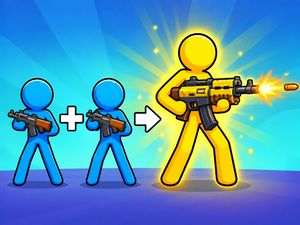
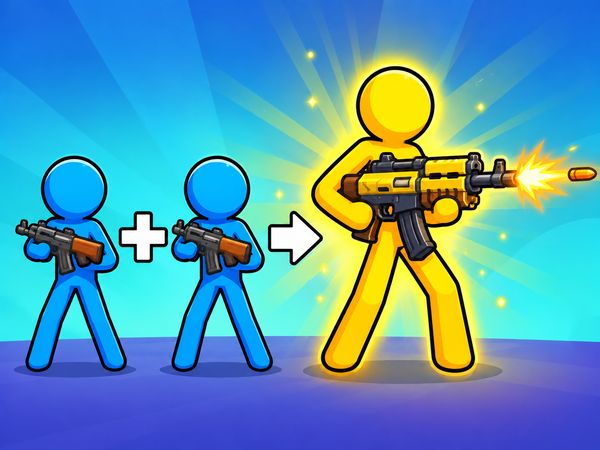
Weapon merging forms the foundation of Stick Merge. You bring matching guns together on the board through mouse-drag controls. A successful merge creates a more powerful version, giving your arsenal a clear path forward.
Think of every weapon as part of a larger plan. Matching pieces too early may leave fewer options for the next merge. Waiting too long can also clutter the board and slow your choices. Look for clean combinations instead of dragging items at random.
The loop feels quick because each merge has a visible purpose. You are not simply arranging objects. You are preparing a stronger weapon for the sniper missions ahead.
Why Each Upgrade Matters
New weapons change how future missions feel. Arsenal upgrades keep your firepower climbing, while merged versions give you better tools for later action. That makes each purchase and merge worth considering.
Do not judge an upgrade only by its immediate appearance. Ask whether it improves your next mission plan. A stronger weapon can reduce pressure when enemies emerge into view, but accurate shooting still decides the result.
When to Stop Holding Back
Save careful merges for moments that offer a clear improvement. Once a stronger weapon is ready, use it rather than endlessly arranging the board. Mission progress depends on turning preparation into action, not keeping every option unused.
Sniper Missions and Target Timing
Reading Enemy Windows
Sniper missions shift your attention from the board to the target area. Enemies emerge into view, creating short moments for a clean response. Mouse movement controls your aim, so guide the cursor before you commit to a shot.
Watch the opening instead of firing the instant anything appears. A target may need a brief moment to settle into a useful position. That pause helps you place the cursor with more care and avoid wasting ammunition.
Mission rhythm comes from reading these windows. Prepare your aim while the area is quiet. When an enemy appears, make one deliberate decision. Accurate shots move the mission forward, while random fire only burns through your resources.
Saving Ammo for Clean Shots
Ammo management matters throughout each mission. Treat every shot as a choice, not a reflex. If the target is poorly exposed, hold your fire and wait for a better opening.
Wasted shots slow progress and can leave you with fewer chances later. Keep your cursor near the action, but do not click from nervousness. A single accurate shot serves you better than several rushed attempts.
Why Precision Beats Panic
Panicked firing breaks the mission rhythm. Stay calm when an enemy emerges, line up the cursor, and fire at the right moment.
Between-Mission Upgrades and Idle Progression
Arsenal Growth Between Runs
Between missions, the game gives your arsenal room to grow. You buy new weapons, then merge them into more powerful versions. This creates a useful break from aiming and lets you shape the tools used in later action.
Use that time with a clear purpose. Look at the weapons already available and consider which combinations make sense. A neat board makes matching easier, while stronger versions prepare you for more demanding sniper moments.
The upgrade loop also gives the game its idle-style feel. Progress does not stop at the end of a mission. Your attention shifts from shooting to building, then returns to shooting when the next mission begins.
What the Idle Layer Changes
Idle progression adds a steady sense of movement between missions. You can focus on improving the arsenal rather than repeating the same shooting task without change. Each upgrade helps the next run feel like a fresh test of aim.
This layer rewards patience. Let the board develop through sensible merges, then use the resulting weapons during missions. The game stays active because preparation and precision support separate parts of the same loop.
How Upgrades Feed the Next Mission
Strong preparation gives you better weapons to use when enemies appear. Still, upgrades do not replace skill. Aim at the right moment, manage ammo, and let the improved arsenal support accurate fire.
That balance keeps Stick Merge from becoming only a merge puzzle. The board builds your options, but the mission decides how well you use them.
Ready to test your aim? Try Stick Merge right here and turn your next merge into a stronger mission setup.
Stick Merge Controls on Browser
Cursor Aiming in the Shooting Range
Stick Merge uses simple mouse controls in the browser. Mouse movement aims at enemies, so move the cursor toward the target before firing. Left click fires during missions, giving you direct control over each shot.
The same left click also supports weapon merging. Drag with the mouse to combine weapons on the board. This creates a clear split between the two parts of play: movement guides your aim, while dragging handles the arsenal.
Keep your hand relaxed during shooting sections. Small cursor movements often give you better control than wide sweeps. Track where enemies emerge, then position the pointer near that area before the next target appears.
When you see a clean opening, press left click once. Do not confuse movement with firing. Guide the cursor first, confirm the target, and then commit to the shot.
During merge sections, drag with purpose. Move one weapon toward its matching partner and release when the combination is clear. Avoid hurried drags that scatter your choices across the board.
These controls keep the game easy to start but hard to master. You need no complex input pattern. The challenge comes from switching smoothly between careful merging and precise cursor aiming.
Browser play also makes short sessions practical. You can begin quickly, test a few merges, and focus on mission timing without learning a large control scheme.
What Makes Stick Merge Harder Than It Looks
Weapon Tier Decisions
Weapon tier decisions begin with timing. A stronger merged weapon looks useful, but the route toward it may consume matching options. Plan each drag before you make it, especially when several weapons sit close together.
Buying new weapons adds another choice between missions. Pick upgrades with the next mission in mind, then merge them into more powerful versions when the board allows it. Do not rush every combination. A tidy plan usually beats constant movement.
The pressure comes from balancing two needs. You want a stronger arsenal, yet you must keep enough control for clean decisions. Let the board support your mission style instead of chasing upgrades without a reason.
Accuracy Under Pressure
Mission pressure rises when enemies emerge into view. Your cursor must move quickly, but your shot still needs control. Aim first, then fire once the target gives you a clean window.
Rushed clicks waste ammo and interrupt your rhythm. Stay ready without firing early. Precision keeps the mission moving when panic would only create extra work.
Avoiding Low-Value Shots
Low-value shots usually come from poor timing. Do not fire at a target that has not offered a clear opening. Wait, track its position, and use the next useful moment.
Every wasted shot slows progress. Protect your ammo, especially when the target area feels busy. One well-placed click is worth more than a burst of guesses.
Stick Merge on Browser and Mobile
Instant Browser Play
Stick Merge runs directly in the browser through HTML5. That makes it easy to start from a computer without setting up a separate game client. The browser version centers on mouse movement, left-click firing, and drag-based weapon merging.
Open the game, focus on the board, and switch between merging and missions at your own pace. The short control set keeps the first steps clear while leaving room to improve your timing.
Mobile Store Presence
TinyDobbins appears as the developer on official-looking listings for both Google Play and the App Store. Those mobile listings give Stick Merge a place beyond browser play.
Mobile play suits the game’s short action loop. You can work through weapon merging and return to sniper timing from a handheld device.
No-Download Access
It runs directly in the browser, so you can reach the action without installing a separate program.
That access keeps the core loop close at hand. Merge weapons, prepare the arsenal, and take careful shots whenever you are ready.
Start playing Stick Merge here and switch between smart merges and sharp sniper timing.
Compare with Similar Games
| Game |
Why Similar |
| House of hazards |
Local multiplayer matches where players trigger hazards against each other while racing to complete tasks |
| Level Devil |
Trap-filled levels that punish careful movement and require repeated attempts to clear |
✨ Key Features of Stick Merge
- Weapon merging
- Sniper missions
- Idle progression
- Arsenal upgrades
- Mouse drag controls
- Mobile listings
How to Play Stick Merge
Step 1: Use the game controls
Use Left Click to fire or + Drag to merge weapons on the board. Use Mouse Movement to aim at enemies.
Step 2: Fuse matching weapons
Drag two identical weapons together to create a stronger version.
Step 3: Shoot only clear targets
Take shots when enemies are visible and avoid wasting ammunition.
Step 4: Repeat the merge-and-shoot cycle
Keep merging, upgrading, and testing your new guns in later missions.
Stick Merge FAQs
Does Stick Merge require a separate installation?
No. The browser version of Stick Merge runs on the page without a separate installation.
Conclusion
Stick Merge combines focused sniper action with weapon merging, creating a clear balance between precision and planning. During missions, take aim at enemies with mouse movement and fire with a left click at the right moment. Since merging alone cannot win missions, accuracy matters just as much as building a stronger arsenal.
Put your aim and merging skills to the test—play Stick Merge right here on this page.

No comments yet. Be the first to share your thoughts!