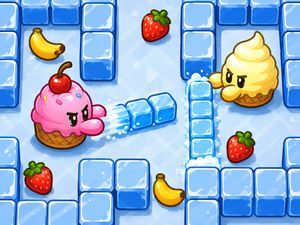
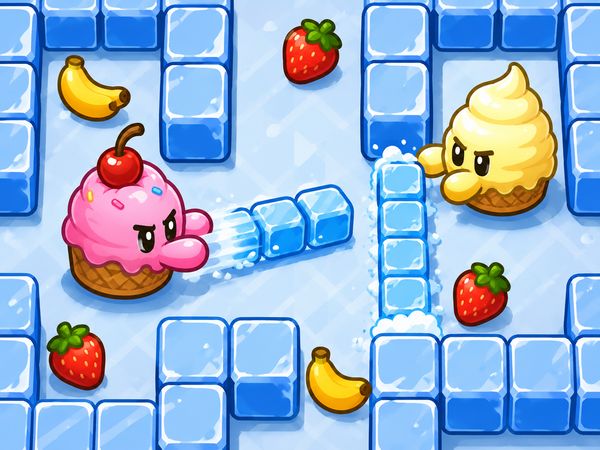
Bad Ice Cream turns a frozen maze into a fast tactical race. You collect every piece of fruit while enemies patrol narrow paths. Your ice power changes the board as you move, creating walls one moment and breaking them the next.
That simple choice gives each level its bite. A wall can block a threat, trap an enemy, or cut off your own route. You must read the maze, act quickly, and keep every detour tied to the fruit still waiting.
Solo runs reward clean movement, while shared play creates lively teamwork and sudden mistakes. The browser version lets you jump into the arcade puzzle without a download. Play Bad Ice Cream online now and start shaping the maze.
Bad Ice Cream Core Objective and Win Condition
Collect Every Fruit
Fruit collection decides whether you clear a level. Each maze places fruit around its paths, corners, and enclosed spaces. Move through the board and gather every piece before progress continues.
Do not treat one nearby fruit as the whole plan. Look across the maze first. A short route may lead toward an open group, while a longer route may expose you to an enemy. Every move should improve your position or bring you closer to another piece of fruit.
The ice system makes collection active rather than automatic. Create a block when a barrier protects the fruit behind it. Break that block when it prevents access. You are not simply walking through a fixed maze; you are adjusting the route while the level unfolds.
Fruit near an enemy needs extra care. You might open a passage, collect one piece, then retreat before moving toward the next. Other times, you can shape a wall and approach from a safer side. Keep checking which fruit remains, especially after a chase changes your route.
Fast movement helps, but speed without direction wastes openings. Scan for reachable fruit, choose a path, and leave space for a quick escape. The strongest runs combine steady collection with small, useful changes to the maze.
Avoid Contact With Enemies
Enemy contact creates the main danger during a collection run. A tempting fruit can draw you into a narrow lane with no safe turn. Watch the space around each target before you commit.
Use distance and corners to control risk. If an enemy approaches, change the route instead of forcing the pickup. An ice wall can interrupt the pursuit or give you time to move around it. Keep your escape path open, because a successful collection means little if contact ends the run.
Ice Block Control and Route Building
Create Safe Paths
Ice blocks form the game’s signature tool. You can create them during a level, then use those new walls to change movement around the maze. This gives you control over routes that first seem dangerous or closed.
Imagine an enemy moving down a straight lane toward you. Place an ice block across that lane, then move through a side opening while the threat loses its direct approach. The wall does not need to cover the whole board. One well-placed block can create the breathing room you need.
Use fresh barriers near fruit when an open route feels exposed. Build a safer edge, step toward the target, and keep another path available. You can also shape a route around a corner instead of crossing the enemy’s line.
Think of each block as a choice with space behind it. A wall helps when it protects movement, but it hurts when it seals your only exit. Build with the next turn in mind, not just the danger in front of you.
Break Open Blocked Lines
Created ice also becomes an obstacle. Break a block when it seals a fruit route or traps you on the wrong side of the maze. Opening one tile can reconnect two useful paths.
Use this action with purpose. Clear the line, pass through, and reassess the enemy’s position. If you destroy too much ice, you may remove a useful shield. If you leave one barrier too many, fruit can remain unreachable.
Use Walls to Split Pursuers
A wall can divide an enemy’s route and change where pursuit happens. Place it across a shared lane, then move through the opening that remains. This turns one dangerous approach into separate spaces.
Keep your own exit clear. A split only helps when you can use the gap before the enemy reaches it.
Ready to test your route choices? Start playing Bad Ice Cream here and reshape the maze yourself.
Single Player and Shared-Screen Co-op
1 Player Mode
Solo play gives you full control over every decision. You choose when to move, build ice, and break a wall. That makes careful route planning easier because no partner can change the board unexpectedly.
Use this mode to learn enemy spacing and fruit routes. Pause briefly before entering a tight lane, then act with a clear exit in mind. Solo efficiency comes from small decisions that keep the maze open.
2 Player Mode
Two-player action turns the maze into a shared problem. One player may block a threat while the other reaches fruit. That same wall can obstruct a teammate moments later.
Shared play feels faster and less predictable. Talk through the next opening, especially before either player changes a central route.
Coordinating Movement
Give each player room to move. One player can draw attention while the other takes a safer line toward fruit. Coordinate wall placement before closing a passage that both players need.
Crowded Board Mistakes
Crowded boards create avoidable errors. Players may follow the same lane, block each other, or trap a teammate behind fresh ice. Spread out, leave turning space, and check where your partner plans to go next.
Bad Ice Cream Controls and Character Setup
Movement Keys
Use the Arrow Keys to move in single-player play. Press the direction that matches the corridor you want to enter, then adjust quickly near corners. Smooth turns matter more than frantic key presses.
Player 2 uses WASD for movement. The layout keeps both players on keyboard controls during shared-screen action. Agree on your starting direction before moving, since two characters can crowd the same opening immediately.
Start by identifying nearby fruit and the safest open lane. Then move with a simple goal rather than wandering. If an enemy enters that lane, change direction and preserve an escape route.
Character setup belongs to the start of play, not to a separate cosmetic system. Once movement begins, focus on the maze, fruit, and ice decisions.
Ice Action Keys
Press Q to break or create ice blocks. Use it when a wall protects a route, blocks access, or changes an enemy’s approach. The same key supports both sides of the ice system, so read the space before pressing it.
Build a barrier to protect movement, then break it when the route becomes more useful open. In co-op, announce the action first. A quick Q press can help one player and hinder the other.
Level Pressure, Timing, and Maze Readability
Reading Block Layouts
Study the board before crossing its widest spaces. Fruit placement shows where you need to go, while block barriers show which routes require changes. Look for openings that let you approach a target without losing a retreat.
Read each wall as part of the route, not as permanent scenery. Decide whether to create a barrier, break an existing line, or leave the layout alone. A clear plan keeps movement quick when the maze becomes crowded.
Watching Enemy Paths
Track enemies before entering a narrow corridor. Their current direction tells you which opening may stay safe long enough for a pickup.
Recheck those paths after changing the maze. A new ice wall can redirect movement and make a once-safe lane risky.
Handling Short Levels
Short levels punish hesitation. Pick a fruit route quickly, then adjust only when a barrier or enemy demands it.
Move decisively through safe openings. Avoid long detours that do not improve your collection progress.
Where to Play the HTML5 Browser Version
Official HTML5 Page
Nitrome later made the original game available as a HTML5-emulated browser version. That page preserves the central maze action: collect fruit, avoid enemies, and shape ice blocks during play.
The HTML5 version suits quick sessions because it runs directly in a browser.
Portal Versions
Bad Ice Cream also appears through browser game pages that provide free access. These versions keep the focus on the same arcade puzzle loop rather than adding unrelated setup.
Open the game page, let the browser load it, and begin your run when the play area appears.
No-Download Access
The HTML5 browser build requires no download. It runs directly in the browser, making it easy to start a solo maze or shared-screen session.
Use the controls listed above, choose your play setup, and begin collecting fruit. Try Bad Ice Cream right here and take control of the ice maze.
✨ Key Features of Bad Ice Cream
- Fruit collection
- Ice blocks
- Maze navigation
- Enemy avoidance
- HTML5 browser play
- Free access
How to Play Bad Ice Cream
Step 1: Use the game controls
Use Arrow Keys to move. Use WASD to move for Player 2. Use Q to break or create ice blocks.
Step 2: Start by choosing a play mode
Pick the available player count before entering the level. Solo play is cleaner, while shared play makes walls and routes matter more.
Step 3: Move through the maze efficiently
Guide your ice cream toward fruit without wandering. Short, direct routes matter because every detour gives enemies more time.
Step 4: Use ice blocks to control space
Create ice where you need cover, and break ice where you need a path. Good players treat the maze as something they can reshape.
Step 5: Trap enemies when they close in
Place ice so monsters lose their easiest approach. A good wall can buy time to grab the last fruit.
Step 6: Collect the remaining fruit first
Clear the most awkward fruit early if it sits behind narrow gaps. That keeps the final moments simpler and safer.
Step 7: Finish before pressure builds
Keep moving once the board is mostly open. The faster you close the level, the fewer mistakes you make.
Conclusion
Bad Ice Cream is a clever arcade puzzle from Nitrome that turns every maze into a tactical challenge. Create and break ice blocks in real time to change the layout, open routes to fruit, slow enemies, and trap threats. Because each level requires collecting all the fruit, every move and detour matters.
Arrow Keys handle movement, while Q creates or breaks ice blocks. Multiplayer adds another layer of strategy, letting two players solve the maze together while coordinating their ice and movement. With its playful concept, adaptable puzzles, and satisfying problem-solving, Bad Ice Cream remains an enjoyable browser experience for solo players and partners alike. Start solving the maze and play Bad Ice Cream here.
Bad Ice Cream FAQs
What are the basic controls for Bad Ice Cream?
Browser keyboard: Arrow Keys — move; WASD — move for player 2; Q — break or create ice blocks.
Can I play Bad Ice Cream without downloading anything?
Yes. The browser version of Bad Ice Cream runs on the page without a separate installation.
What is the main goal in each level?
Bad Ice Cream uses this progression structure: The player can create and break ice blocks during a level, changing the maze layout in real time.

No comments yet. Be the first to share your thoughts!