2v2.io drops you into a shrinking arena with one partner, a gun, and the power to build a fort in a heartbeat. Every fight turns into a mix of aim, speed, and smart construction. You and your teammate hold the walls while two rival duos try to do the same thing. Last squad standing takes the win.
The game comes from Legion Games and runs on Unity WebGL. It is a third-person battle royale shooter, so you see your character and the structures around you. You shoot with the mouse and place walls, floors, stairs, and pyramids with single key presses. Quick builds save you in open ground, and smart edits win close fights.
You can play 2v2.io online and be in a match within moments. Start a match here and learn the build rhythm before the zone closes in.
Core Match Structure and Duo Survival in 2v2.io
Contracting Arena Boundaries
Each match starts with two-player teams dropped into a combat arena. You land, find a weapon, and look for cover. Nobody gets a calm opening for long, because the arena keeps getting smaller as the match runs.
The shrinking safe zone is the heart of the pacing. It pushes every team toward the center, so scattered duos end up in the same cramped space. Early on, you have room to loot and plan. Later, the open ground disappears and fights happen at close range.
That squeeze shapes how you should play. Pick up what you need with the E key, then start moving inward before the edge forces you. Waiting at the rim gives other teams the chance to hit you from higher ground. Use the Tab key to toggle the map and check where the safe area sits.
The endgame rewards teams who already hold good positions. A fort built near the middle gives you cover while rivals cross open space to reach you. Keep one eye on the boundary and one on your partner. A duo that stays close can trade shots and rebuild walls faster than two lone players ever could.
Duo Matchmaking and Team Elimination
Open the main menu and choose the matchmaking option. You can pair up with a friend for a premade duo, or enter the queue and get a random partner. Either way, you queue as a team of two.
The victory rule is simple. Eliminate every other squad, and your team wins. Staying alive longer and playing well also helps you stack more rewards over time, so a careful run still pays off even when you fall short of first place.
Mastering the Real-Time Building System
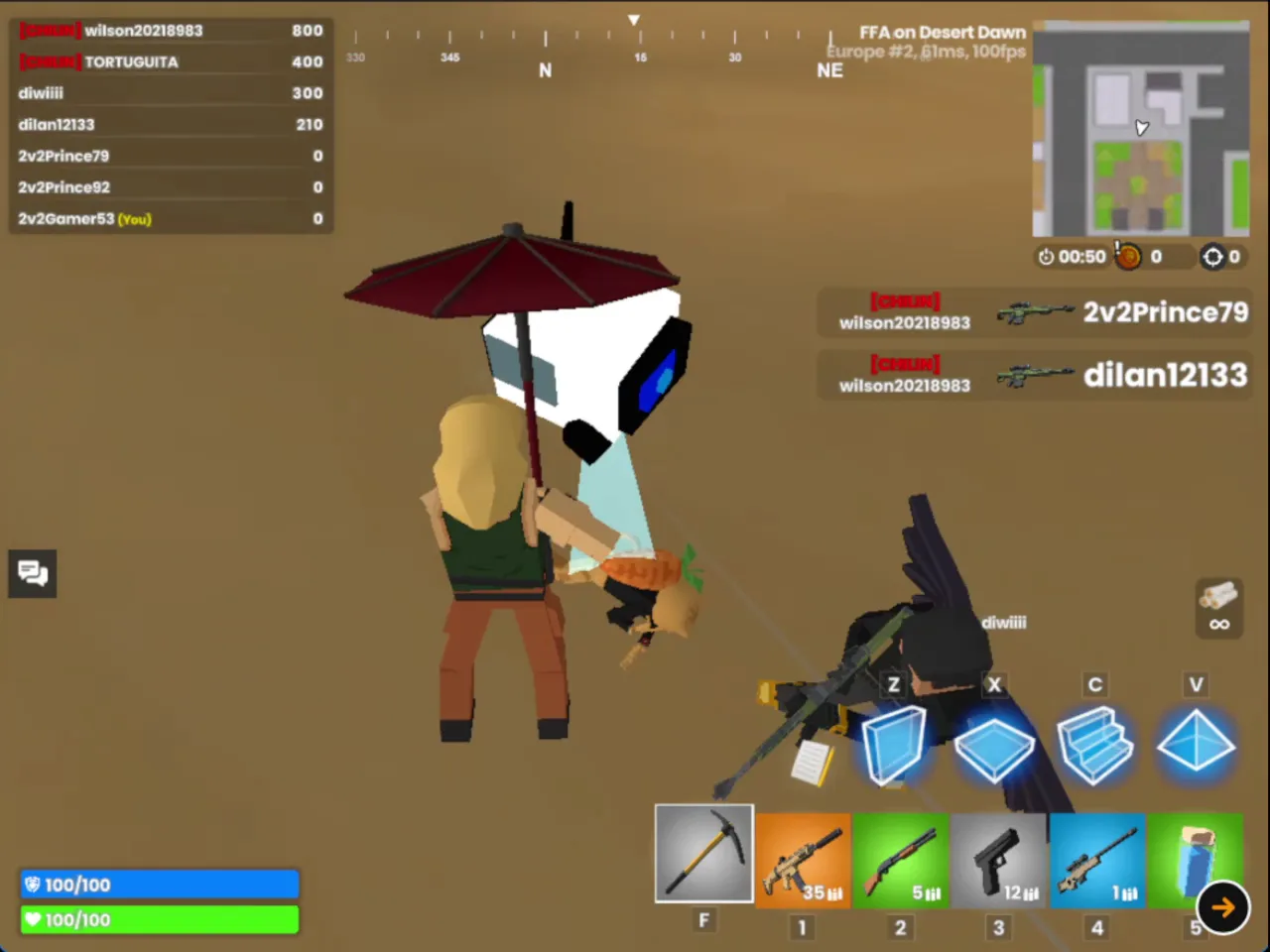
Screenshot of 2v2.io in play: the build icons for Z wall, X floor, C stairs and V pyramid sit above the weapon hotbar.
Four-Piece Architecture
Building is what sets 2v2.io apart from a plain shooter. Four keys handle it all: Z places a wall, X places a floor, C places stairs, and V places a pyramid. The pieces go up in real time, so you can react the moment shots start flying.
The panic wall is your best defense against a surprise attack. When bullets land from an unseen angle, tap Z at once to throw a wall between you and the shooter. That break in the fire buys you a second to think. From there, add a floor or a pyramid to close the gaps and turn that single wall into a small box.
Stairs give you height. Tap C to climb toward a better angle, then build around yourself as you rise. Practice the four keys until your hand finds them without thought. Players who fumble the hotkeys under pressure lose fights they should have won.
Rapid Structural Edits
Press the G key to edit a structure you already placed. You can open windows, doors, or half-wall gaps in a solid barrier. This turns a plain box into a firing position.
Here is the trick. Sit safely inside your walls, open a small window, and fire a quick rifle shot at an approaching enemy. They expect a closed wall, so the sightline catches them off guard. Close or rebuild the gap right after and keep your cover.
Weapons and Combat Tactics in 2v2.io
Firearm Selection and Range Management
Shooting is simple to learn. Press the left mouse button to fire and hold the right mouse button to aim down sights. Aiming tightens your shots, so use it when a target holds still at a distance. Press R to reload before you walk into a fight, not during it.
You will find rifles and heavier armaments on the ground. Grab them with the E key. The F key selects your first weapon, and the number keys switch between weapon slots. Quick swaps matter, because the right gun changes with the gap between you and the enemy.
Match your weapon to the range. Rifles suit mid-distance pokes through a window you just opened. Heavier guns reward you when the shrinking zone forces a close fight. Keep both ready, and swap based on where your rival stands instead of sticking with one favorite.
Seizing High Ground Advantage
Ramps give you verticality, and height wins fights. A player standing above a lower defensive box has a clear angle over its walls. Build stairs with C, climb, and fire down on rivals who stay low.
Watch your own footing, too. Climbing exposes you for a moment, so wall up as you rise. A partner who covers your climb makes the push far safer.
Cross-Platform Controls and Mobile Interface
Desktop Keyboard and Mouse Handling
Move with the WASD keys or the arrow keys. Press the space bar to jump, hold Left Ctrl to crouch, and hold Left Shift to sprint. Sprinting gets you across open ground faster, while crouching helps you stay low behind cover.
Your hotkeys sit within easy reach. Z, X, C, and V build, G edits, R reloads, and E picks up items. The Tab key shows the leaderboard and toggles the map. Press B to emote and Enter to chat or confirm.
The mouse covers the rest. Left click shoots, right click aims, and the middle button marks a waypoint. Use that waypoint to point your partner toward a spot worth holding.
Dedicated Mobile Touch Layout
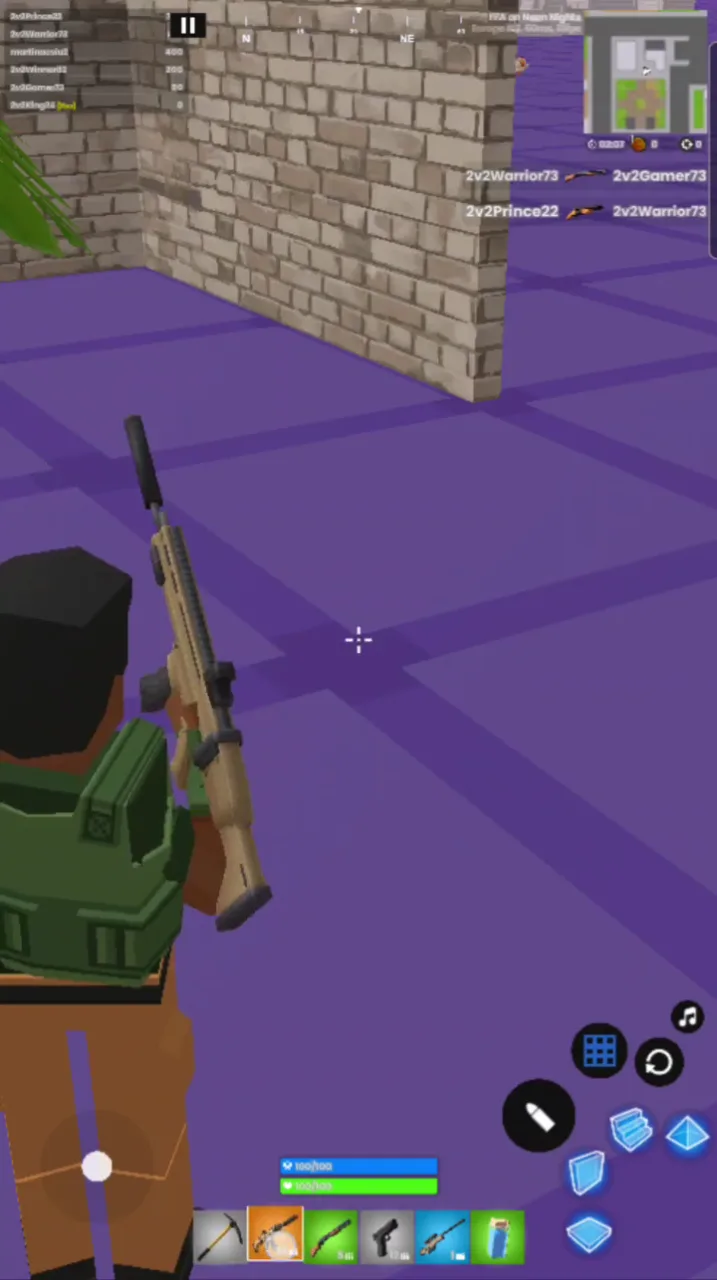
2v2.io opens in a phone browser and brings its own control buttons. Tap and hold the bottom-left icons to move. The bottom-middle icons switch weapons through quick-swap buttons, and the bottom-right icons handle actions. Dedicated build buttons keep structures one tap away.
Screenshot from a phone: 2v2.io gameplay with a rifle held in the first-person view and touch buttons at the bottom right.
Progression, Customization, and Arena Mastery
Match Performance Rewards
Every match feeds a progression track that awards XP, coins, and cosmetic weapon skins. Surviving longer and playing strongly stacks more rewards over time. A deep run into the endgame pays better than an early exit.
Gems and coins come from other sources too. Login rewards and quests add to your totals, so returning often helps your progress. Treat each match as a chance to build toward your next unlock, win or lose.
Lockers and Cosmetic Upgrades
Spend what you earn on visual custom cosmetics, character skins, and weapon looks. These changes affect how your gear appears, not how it performs. Everyone fights on equal footing, so your skill decides the match. Try 2v2.io now and start earning your first unlocks.
✨ Key Features of 2v2.io
Fast-paced 2-player team battle royale combat
Real-time building system featuring walls, ramps, floors, and roofs
Shrinking safe zone mechanics that force close-range endgames
Direct browser compatibility across desktop and mobile devices
Progression track awarding XP, coins, and cosmetic weapon skins
How to Play 2v2.io
Step 1: Use the game controls
Use WASD Keys to move. Use Arrow Keys to move. Use Space Bar to jump. Use Left Ctrl Key to crouch.
Step 2: Select Your Matchmaking Mode
Choose whether to invite a friend into a private duo lobby or enter the public queue to partner with a random online player.
Step 3: Deploy Into the Arena
Spawn onto the combat map, orient your surroundings, and navigate toward shelter while tracking the perimeter boundaries.
Step 4: Erect Defensive Structures
Press the structural hotkeys (Z, X, C, V) to assemble walls, floors, and ramps whenever incoming enemy fire threatens your position.
Step 5: Engage Opposing Squads
Aim down sights with the right mouse button and fire your primary weapons to crack rival barricades and deplete enemy health bars.
Step 6: Rotate Inward and Secure the Win
Stay ahead of the closing boundary zone, support your downed or pressured partner, and eliminate the final surviving rivals to claim victory.
2v2.io FAQs
What are the basic controls for 2v2.io?
Browser keyboard: WASD Keys — move; Arrow Keys — move; Space Bar — jump; Left Ctrl Key — crouch; Left Shift Key — sprint; R Key — reload; Z Key — wall; X Key — floor; C Key — stairs; V Key — pyramid; G Key — edit build; Tab Key — view leaderboard, toggle map; Enter Key — enter; B Key — emote; E Key — pick item; F Key — weapon 1; Number Keys (0-9) — weapon slot. Browser mouse: Left Mouse Button — shoot; Right Mouse Button — aim; Middle Mouse Button — mark waypoint. Mobile: Tap and Hold the Bottom-Left Icons — move; Tap the Bottom-Middle Icons — weapons; Tap the Bottom-Right Icons — action.
Can I play 2v2.io on mobile devices?
Yes. 2v2.io runs in your phone or tablet browser, and it has touch controls. There is also a mobile app.
Do I need to download 2v2.io?
No. 2v2.io runs in your browser on this page, with nothing to download or install.
How does duo matchmaking work in the game?
From the main menu matchmaking screen, you can generate a lobby link to queue directly with a friend. Alternatively, you can enter the public matchmaking pool to pair up with a random partner.
Conclusion
2v2.io is a multiplayer battle royale third-person shooter that pairs gunplay with fast, creative building. You can throw up walls, floors, ramps, and pyramids on the spot, using them as cover in open ground or as ramps to grab the high ground mid-fight.
The editing system adds another layer of tactics. Open a window, door, or half-wall gap in your own structure and you can line up a rifle shot while staying protected, catching approaching enemies off guard.
Runs in your browser on desktop or mobile with no setup. Jump in here, build your first box, and see how long you can last.
2v2.io Game Image
Game Controls
WASD Keys
Move
Arrow Keys
Move
Space Bar
Jump
R Key
Reload
Z Key
Wall
X Key
Floor
C Key
Stairs
V Key
Pyramid
G Key
Edit Build
Tab Key
View Leaderboard, Toggle Map
Enter Key
Enter
B Key
Emote
E Key
Pick Item
F Key
Weapon 1
Number Keys (0-9)
Weapon Slot
Left Mouse Button
Shoot
Right Mouse Button
Aim
Middle Mouse Button
Mark Waypoint
Tap and Hold the Bottom-Left Icons
Move
Tap the Bottom-Middle Icons
Weapons
Tap the Bottom-Right Icons
Action
No comments yet. Be the first to share your thoughts!



No comments yet. Be the first to share your thoughts!