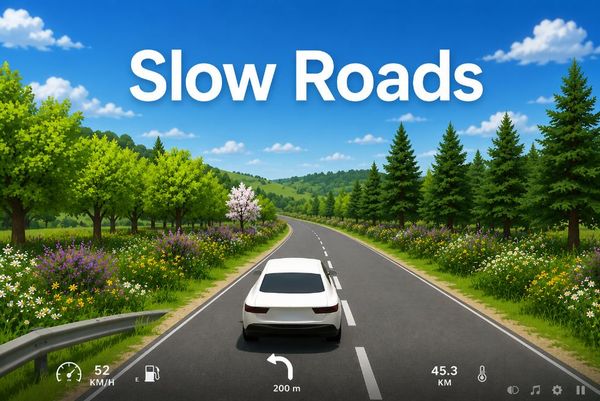
Slow Roads drops you onto an endless ribbon of asphalt that builds itself just ahead of your wheels, and nothing ever tells you to hurry. Anslo, the solo developer behind it, first built it as a browser tech demo to test real-time procedural terrain on Three.js. The idea worked so well that people kept driving long after the demo should have ended.
There are no rivals, no timers and no score to chase. You steer, you pick a speed, and you watch hills and bends roll in. It is a driving simulator for singleplayer sessions where the road itself is the main attraction.
You can play Slow Roads online in a single tab and start cruising within seconds. Start playing Slow Roads now and see how far one stretch of road can take you.
Handling Dynamics and Transmission Layouts
Rear-Wheel Drive Drift Characteristics
Slow Roads rewards a gentle touch more than a heavy one. Your steering keys decide how sharply the car turns, so short taps work better than long holds. Feather A or D through a bend and let the car settle into the curve.
The Space key works as a handbrake. Tap it when you want the back of the car to swing wide through a corner. B toggles the handbrake on and off if you would rather not hold a key down.
Try this on a wide, open bend. Build some speed, steer into the curve, tap Space, then release it and straighten out. You will feel the car change direction faster than it does with steering alone.
Left Shift adds boost, and boosting into a turn makes everything twitchier. Save it for long straights where you have room to spare. Practice the handbrake first at low speed, then raise your pace as the timing starts to feel natural. Press R to reset if a slide goes wrong and you want a clean start.
Managing Momentum Across Uneven Slopes
Hills change how a drive feels. A climb asks you to hold your throttle steady, while a descent lets you ease off and coast. Pay attention to the road ahead so you know which is coming.
Use S or the Down Arrow to slow down before a steep drop. Early, gentle braking beats a last-second stab at the key. If the speed still feels like too much, tap the handbrake lightly through the turn.
Mastering Slow Roads Autodrive and Cruise Control
Hands-Free Scenic Cruising
Tired of steering? Press F to toggle autodrive and let the car follow the road on its own. Your hands come off the keys, and your eyes go to the scenery. This is the mode for watching the terrain shaders roll past.
G toggles the autodrive mode, which lets you switch how the feature behaves. Experiment with it during a calm stretch so you know what each setting does before you rely on it.
Cruise control works alongside your own steering. Press J to toggle it, and the car holds a steady speed while you handle the turns. That split is handy on winding roads where you want to focus on the line instead of the throttle. V locks the steering if you want the wheel to stay put for a moment.
Combine these tools for the calmest drive possible. Switch on autodrive, then press U to hide the interface and enjoy a clean view. Try Slow Roads right here and see how peaceful a self-driving road trip can feel.
Fine-Tuning Speed Increments
Once cruise control is on, you adjust the pace with two keys. Press I to increase the set speed and K to decrease it. Small taps move the number in steps, so you can match the road without touching the throttle.
L toggles the cruise control mode when you want a different style of speed holding. Slow down before tight bends and raise the speed again once the road opens up.
Environmental Lighting and Weather Systems
Atmospheric Time and Season Switches
Slow Roads is as much a mood as a driving game. Press E and Q to move between scenes, and each one shifts how the world looks around your car. The light, the colors and the sense of space all change with the scene you choose.
This turns one road into many different drives. A trip through one scene feels bright and open, while another feels quiet and moody. Flip through them early in a session to find the one that fits how you feel.
Pair the scene you like with a long autodrive stretch. Sit back and let the world go by while the lighting does the work. Press F4 only if you want the debug overlay, since it adds technical information rather than atmosphere.
Managing Visibility in Low-Light Conditions
Darker scenes make the road harder to read. Press H to toggle your headlights and light the asphalt ahead of you.
Slow down when the view gets dim. Lower speeds give you more time to see a bend coming. Cruise control helps here, because you can set a gentle pace and concentrate on steering.
Essential Survival and Navigation Strategies
Recovering from Off-Road Deviations
Everyone drifts off the road sooner or later. Nothing stops you from rolling into the open fields, and wandering there can be fun for a while. When you want to get back, you have two clean options.
Press R to reset the car and start fresh on the road. That is the fastest fix when you are stuck or lost. You can also steer back toward the asphalt using A and D, then ease the car onto the road with gentle inputs.
Turn the wheel slowly when you rejoin the road. Sharp turns at the edge make the car wobble, so give yourself a wide, smooth arc.
Using Cinematic Cameras for Pure Relaxation
Press T to toggle the Cinecam and get a camera that frames your drive like a short film. Press C to change the camera view whenever you want a new angle on the car.
The Numpad keys let you look around freely. Use 4 and 6 for left and right, and 8 and 2 for up and down. Try these views while autodrive handles the steering, then browse more driving games in the Games collection when you want a new ride.
Compare with Similar Games
| Game |
Why Similar |
| Stunt Simulator |
Both feature 3D vehicle driving physics where players freely navigate open environments using direct steering, acceleration, and braking controls without strict racing timers. |
🎯 Fun Facts About Slow Roads
- Many players utilize the game's autodrive and ambient night drives as an interactive ASMR relaxation aid.
✨ Key Features of Slow Roads
- Lightweight browser execution powered by Three.js
- Zero time limits, competing racers, or collision damage
- Configurable time of day, seasonal palettes, and weather
- Integrated Autodrive and Cruise Control systems
- Instant vehicle recovery with single-key road snapping
How to Play Slow Roads
Step 1: Use the game controls
Use Arrow Keys to drive. Use W Key to drive Forward. Use S Key to drive Backward. Use A Key to steer Left.
Step 2: Load the Road
Wait for the Three.js procedural environment to initialize your car directly in the center of the lane.
Step 3: Accelerate and Steer
Press W or Up Arrow to accelerate while using A and D to smoothly guide your car through curves.
Step 4: Adjust Scenic Conditions
Cycle through different daylight, weather, and seasonal profiles to tailor the atmosphere to your preference.
Step 5: Reset After Leaving the Tarmac
Press the R key whenever you drift off course to instantly place your vehicle back on track.
Slow Roads FAQs
Can I play Slow Roads on mobile devices?
Slow Roads opens in a phone browser, but it is played with the keyboard, so a computer works best.
What are the basic controls for Slow Roads?
Browser keyboard: Arrow Keys — drive; W Key — drive forward; S Key — drive backward; A Key — steer left; D Key — steer right; Left Shift — boost; R Key — reset; C Key — change camera; E Key — next scene; Q Key — previous scene; F Key — toggle autodrive; G Key — toggle autodrive mode; Space Key — handbrake; B Key — toggle handbrake; H Key — toggle headlights; V Key — lock steering; M Key — mute; P Key — pause; U Key — toggle ui; J Key — toggle cruise control; I Key — increase cruise control; K Key — decrease cruise control; L Key — toggle cruise control mode; T Key — toggle cinecam; F4 Key — toggle debug overlay; Numpad 4 — camera left; Numpad 6 — camera right; Numpad 8 — camera up; Numpad 2 — camera down. Browser mouse: Left Mouse Button — drive forward; Right Mouse Button — drive backward.
Do I need to download Slow Roads?
No. Slow Roads runs in your browser on this page, with nothing to download or install.
Is Slow Roads a horror game?
No, Slow Roads is an entirely peaceful driving simulation with no monsters, jump scares, or threats. Driving at night through isolated countryside roads can feel eerie to some players, but the experience remains completely serene.
Can we play multiplayer in Slow Roads?
Slow Roads is listed as Singleplayer.
Conclusion
With simple controls like the arrow keys or W, A, S and D, plus a boost on Left Shift, you can settle in behind the wheel in seconds.
What makes it stand out is the freedom to tailor the drive. Switch the camera with C, flip between scenes using Q and E, toggle autodrive or cruise control, and even hide the UI for a calmer view.
Ready to hit the road? Start driving here, right on this page, and enjoy the journey.

No comments yet. Be the first to share your thoughts!