Stunt Simulator turns speed into a stunt playground, where realistic physics make every drift, ramp, and landing matter. This 3D driving sandbox gives you ten vehicles and two maps to explore. You are not simply chasing a finish line. You are testing control while carrying speed through wild setups.
The browser build runs through HTML5 and supports single-player driving. Its appeal comes from freedom. Push into a corner, hold a slide, or launch from a ramp when the line looks right. Realistic physics make small steering errors feel important, especially when a fast approach sends the vehicle wide.
Use the controls, experiment with each vehicle, and learn how both maps respond. Play Stunt Simulator online and start building cleaner, bolder runs right here.
Stunt Simulator’s Core Loop and Scoring
Why stunts matter more than racing
Stunt Simulator focuses on movement rather than ordinary race pace. The 3D driving sandbox gives you room to shape each run around drifts, jumps, and controlled landings. A fast route matters, but the more useful question is how well you use that speed.
Drifts add a clear skill layer. They ask you to turn while keeping the vehicle useful for the next stunt setup. Realistic physics also make every approach feel different. Enter too sharply, and the vehicle can lose its line. Enter with control, and the same corner becomes a launch point for another move.
That freedom changes your goal. You can search for a smooth chain of movement instead of following one fixed racing line. Pick a vehicle, test the map, and adjust your route after each attempt. The best runs feel planned, but they still leave room for a last-second save.
How points come from risky movement
Risky movement gives a stunt run its purpose. A long drift shows control, while a fast ramp approach tests your timing and steering. Each choice creates a trade-off between keeping the vehicle stable and pushing the next move harder.
Use speed when the setup looks open. Protect the run when the landing looks narrow. A clean drift can keep your vehicle ready for the next section, while an overworked approach may end the attempt before you reach it. Think of every stunt as a test of control, not just a burst of speed.
What separates clean runs from big runs
Clean runs keep the vehicle moving with fewer corrections. Big runs take more chances, but they still need an usable line afterward. Watch how the vehicle reacts, then repeat the movements that keep your speed under control. Consistency gives you a base for stronger stunts.
Vehicles, Handling, and Map Choice
The 10-car roster
Stunt Simulator includes ten vehicles, giving you plenty of handling behavior to compare. Do not judge a car after one turn. Take it through a drift, approach a ramp, and watch how easily you correct its direction afterward.
One vehicle may feel comfortable when you carry speed into a corner. Another may demand earlier steering before a stunt setup. Realistic physics make these differences useful rather than cosmetic. The roster gives you reasons to test different approaches instead of forcing every run into one pattern.
Start with a vehicle that feels predictable. Learn its response on both maps. Then switch to another car and repeat the same route. That simple comparison shows which changes come from the vehicle and which come from your own timing.
How handling changes your stunt style
Handling affects how boldly you can enter each setup. A vehicle that responds quickly may suit tight corrections before a ramp. A different car may feel better when you want a longer, steadier drift.
Use the first few attempts as tests. Turn earlier, release your correction sooner, and compare the result. Do not copy one driving style across the entire roster. Let each vehicle decide how much speed and steering you can carry comfortably.
Choosing between the two maps
The game offers two maps, so use both as practice grounds. Try the same vehicle on each one and note where your lines feel natural. One map may suit your drifting rhythm, while the other exposes weak timing. Switching maps keeps your practice honest.
Mastering Stunt Simulator Controls and Movement
WASD and arrow-key driving
Drive with either the WASD keys or the arrow keys. These are the verified movement controls for Player 1. Choose the layout that lets your steering hand stay relaxed during long attempts.
Use small inputs near a ramp or landing. Large presses can send the vehicle away from the line before you can correct it. Keep your steering changes measured through corners, then make a stronger adjustment only when the setup demands it.
Space activates FRENAR, giving you a direct way to reduce speed. Ctrl activates NITRO, which helps you add speed when the route gives you room. Learn both bindings early, because quick control changes matter more than frantic key presses.
Using speed for ramps and airtime
Build speed before a ramp, but keep your approach straight enough to use it. A fast entry helps create a more exciting launch. It also leaves less time for recovery when your angle looks wrong.
Use NITRO with purpose. Press Ctrl when the setup has space ahead, not while you are already fighting the steering. Save your correction for the landing. The strongest airtime attempts begin with a stable approach and end with calm inputs.
When to slow down before takeoff
Press Space when your approach feels too fast or misaligned. Slowing before takeoff can protect the run and improve your launch angle. Do not treat maximum speed as the answer to every stunt.
Start playing Stunt Simulator here, then test one control change at a time.
Stunt Simulator gameplay
Avoiding the mistakes that waste a run
Do not combine full speed with late steering corrections. Avoid forcing a drift after the vehicle has already lost its line. Also resist using NITRO when the route ahead offers no room. Slow down, reset your angle, and protect the next setup.
Stunt Simulator Multiplayer and the Separate Variant
Single-player browser build
The browser build of Stunt Simulator is a single-player experience. You drive alone through its ten-vehicle roster and two maps, focusing on movement, drifts, and stunt setups.
That solo format makes practice easy to control. Repeat a route, change vehicles, and test your assists without another player changing the situation.
The standalone Multiplayer release
Stunt Simulator Multiplayer exists as a separate release on Steam. Treat it as its own version rather than an extension of the browser build. Its multiplayer label signals a different experience from the single-player game covered here.
The two titles share a related name, but they should not be blended when comparing features.
What changes when other players join
Other players change the rhythm of stunt driving. You must react to human choices instead of practicing a fixed solo route. A safe line may become crowded, while a risky move may create a new challenge.
Try Stunt Simulator now and put your best stunt lines to the test.
✨ Key Features of Stunt Simulator
- 10 vehicles
- Two maps
- Realistic physics
- Traction Control
- Multiplayer variant
How to Play Stunt Simulator
Step 1: Use the game controls
Use Arrow Keys / WASD to dRIVE. Use Space to fRENAR. Use Ctrl to nITRO.
Step 2: Choose the map that suits your goal
Use the city map for tighter route reading, or the open playground for freer stunt chains. The two-map setup matters because each one changes your ramp angles and recovery room.
Step 3: Build speed before every big jump
Approach ramps with enough momentum to clear them cleanly. Too little speed cuts airtime short, while too much speed can make landing recovery harder.
Conclusion
Stunt Simulator is an HTML5 3D stunt driving sandbox built for single-player freedom and controlled thrills. Its Traction Control prevents spinning out or slipping during drifts, helping you carry speed through corners and stunt setups. Drift Assist automatically adjusts steering and speed, making long slides and cleaner stunt lines easier to execute while keeping the action accessible.
Drive with the Arrow Keys or WASD, brake with Space, and activate nitro with Ctrl. Whether you are refining a smooth drift or testing your control through a stunt setup, the combination of helpful driving features and open-ended play creates an engaging experience. Start playing Stunt Simulator here and put your driving skills to the test.
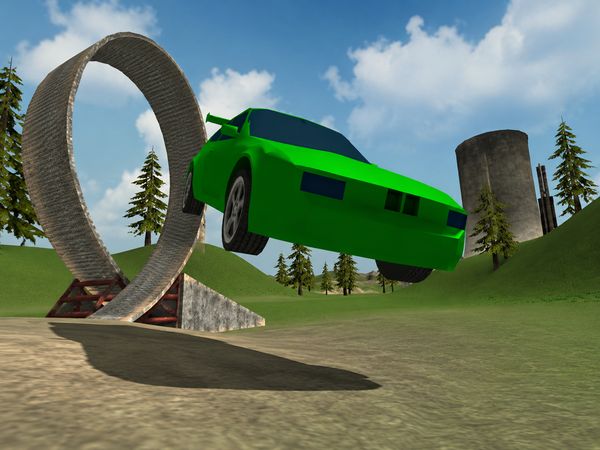
Stunt Simulator Game Image

No comments yet. Be the first to share your thoughts!