
Drift boss
drift to the right
drift to the right
Game Details
- Technology: HTML5
- Playable on: Browser
- Genre: Endless Drifting Arcade Racer
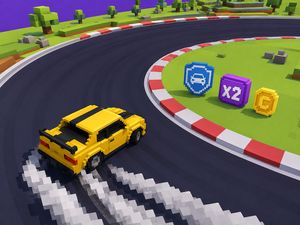
Drift boss turns every sharp corner into a split-second steering test. Hold the control, and the car turns right. Release it, and the car turns left. That simple rhythm creates a tense endless drifting arcade racer where one late decision can end a promising run.
The road keeps demanding attention. You must read each bend, judge its timing, and keep the car on a narrow path without guardrails. Distance measures survival, so every clean turn adds value to the run. Quick sessions make each attempt easy to start, yet difficult to perfect.
Play Drift boss online and focus on the road ahead, not complicated menus or crowded controls. Small timing improvements can carry you farther than frantic inputs.
Drift boss gives you a very small control set. The keyboard uses the Space Bar. Hold Space Bar to turn right, then release it to turn left. The mouse follows the same rule. Hold the Left Mouse Button to turn right, and release it to turn left.
That design leaves no room for extra steering commands. You do not switch between several buttons while a bend approaches. Instead, you manage the timing of one repeated action. A short hold changes the car’s direction. A longer hold keeps that turn active. Releasing changes the direction again.
Sharp turns make each choice matter. A bend may look manageable from a distance, then demand a quick change as the road moves underneath the car. Press too soon, and the car may turn before the corner needs it. Wait too long, and the car may reach the edge before your correction takes effect.
The road has no guardrails. That fact changes how you treat every mistake. A small error near the middle may still leave room for another adjustment, while an error near the edge gives you far less space. You must keep watching the road position rather than staring only at the next curve.
Drift boss also keeps the focus on a singleplayer run. There is no rival car to block your line or force a side-by-side decision. Your opponent is the road itself, along with your own timing. Each attempt starts with the same basic challenge: steer through turns and stay on the platform.
Expect fast restarts and short attempts. The game does not need a long setup before the action begins. That makes failure useful when you study it closely. Notice whether you held too early, released too late, or failed to prepare for the next bend.
Keep inputs calm. Rapid, uncertain changes can make your steering harder to read. A deliberate hold followed by a clean release gives you a clearer rhythm. Once that rhythm feels natural, you can spend more attention on the road shape and less on remembering the controls.
Look beyond the closest section of road. Sharp turns often punish players who react only when the bend reaches the car. Read the road’s direction early, then decide when your hold or release should begin. Winding roads create a chain of decisions, so finish one turn with the next bend already in mind. Keep your eyes moving. The safest line comes from anticipation, not panic.
Press the Space Bar or Left Mouse Button before the turn fully arrives when the road clearly bends right. Holding earlier gives the car time to begin that direction. Do not press simply because a corner appears on screen. Match the start of the hold to the road’s approach, then watch the car’s position.
Release as the road calls for a left turn. A clean release avoids adding extra movement to the decision. Stay deliberate, watch the bend, and prepare for the next change.
Drift boss measures progress through distance-based survival. The longer you remain on the road, the farther the run reaches. This gives every clean corner a clear purpose: preserve the attempt and extend its distance.
Distance also makes simple comparison easy. You can remember how far one run traveled, then aim to pass that mark next time. The game does not require a complicated objective during play. Stay on the path, handle the turns, and protect the run.
Use each attempt as a small test. If you fall near one bend, focus on that bend during the next run. If you survive it, keep the same calm timing for the road that follows. Progress comes from repeating useful decisions, not from rushing through the opening section.
Longer runs place more turns between you and a finish because the game uses endless runs. Your attention must stay steady for the entire attempt. A rhythm that works on one bend may need a small timing change on the next. Distance raises the cost of losing focus.
Set a clear target before restarting. Beat your last distance by one more section, then repeat. Keep the useful timing from earlier turns, but treat each new bend as its own decision. Small gains build a stronger personal best.
Try Drift boss right here and make your next run count.
The browser version supports two verified desktop input options. Use the Space Bar on a keyboard, or use the Left Mouse Button. Both inputs follow the same turn pattern, so you can choose the option that feels more comfortable.
Hold the Space Bar to turn right. Release the Space Bar to turn left. With a mouse, hold the Left Mouse Button to turn right. Release the Left Mouse Button to turn left.
Keep the input simple and consistent. Do not switch between keyboard and mouse during a difficult bend unless you have a clear reason. Familiar timing matters more than the device itself. Start with brief practice on the opening road, then carry that rhythm into sharper corners.
Browser play also suits quick sessions. You can focus on timing without learning a large control scheme.
Drift boss appears in browser play and in mobile app listings. Use the verified desktop bindings when playing in a browser, and judge each version by its presented input method.
The key skill remains timing around turns. Avoid assuming that a different device changes the road challenge. Focus on steering decisions and staying on the path.
The road gives you limited room to correct a turn. Its edges stay exposed because no guardrails protect the car. That makes the center of the path feel valuable, especially when a sharp bend follows another bend.
Watch the space beside the car as well as the road ahead. A turn can look correct while the car drifts toward an edge. Make your next input with that position in mind. Calm adjustments protect more space than sudden reactions.
When the car leaves the road, it falls from the platform. Falling ends the run, so the distance gained during that attempt stops there. The failure state comes directly from missing the road’s narrow boundaries.
Restart with one specific correction in mind. Begin the next turn earlier, release sooner, or hold for less time. Avoid changing everything at once. A focused adjustment shows which timing choice caused the previous fall.
Drift boss runs directly in the browser through HTML5. The browser version supports free online play and suits quick sessions. You do not need a download to begin. Open the game, select a verified desktop input, and guide the car through its endless road.
The game also appears as mobile app listings on Google Play and the App Store.
Keep the documented core in view across versions: an endless drifting arcade racer, singleplayer runs, sharp turns, and distance-based survival.
Look past the current tile and prepare for the next sharp turn.
Use brief presses when the road bends quickly, and avoid holding too long.
Aim to leave enough space for the next corner instead of overcorrecting.
After a fall, use the next run to adjust the timing of your presses and releases.
No. The browser version of Drift boss runs on the page without a separate installation.
The mobile listings are separate app-store entries, but the browser version is clearly presented as free to play.
Drift boss is an engaging HTML5 endless drifting arcade racer built for quick, focused fun. Its singleplayer format keeps the experience easy to start, while the streamlined design lets the drifting action take center stage. With browser access, you can jump into a run without extra setup and enjoy a game that is both approachable and replayable.
The controls are refreshingly simple: hold the Space Bar or Left Mouse Button to turn right, then release to turn left. This clear two-way system makes every moment about timing and control, giving Drift boss its distinctive appeal without unnecessary complexity. If you are ready for a focused arcade racing experience, play Drift boss here and start drifting now.
No comments yet. Be the first to share your thoughts!